Host Domination Booking Rules
Set restrictions for specific calendars and periods of the year, define allowed arrival and departure days, minimum, maximum, or exact stays, booking windows, seasonal exceptions, and rules to prevent gaps between bookings.
After purchase, you will receive the add-on package and license code by email.

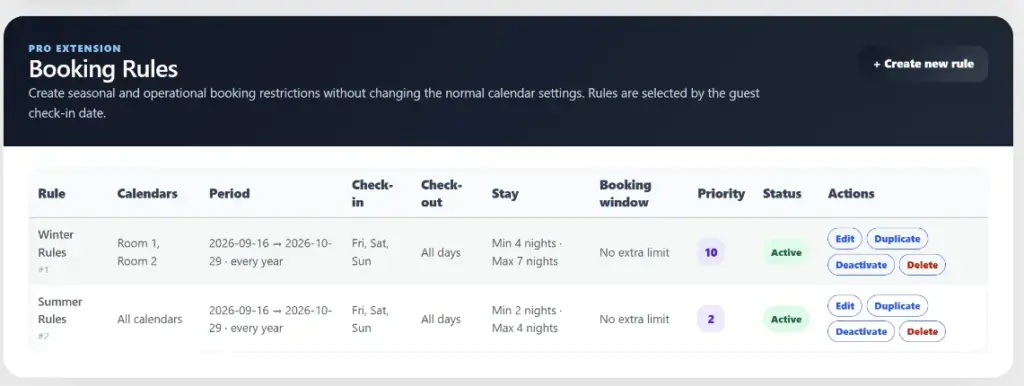
About this add-on
Advanced Rules for Check-in, Check-out, and Stays in Your Booking Engine
Managing direct bookings is not only about setting a price and displaying available dates.
During certain periods, you may want to accept check-ins only on specific days of the week, impose a minimum or maximum stay, allow departures only on certain days, or apply different rules during high and low season.
Host Domination Booking Rules extends Host Domination Booking Engine PRO with an advanced system for creating and managing custom booking rules for vacation rentals, B&Bs, apartments, guest houses, and accommodation businesses.
You can create all the rules you need and apply them only to the calendars and periods you choose.
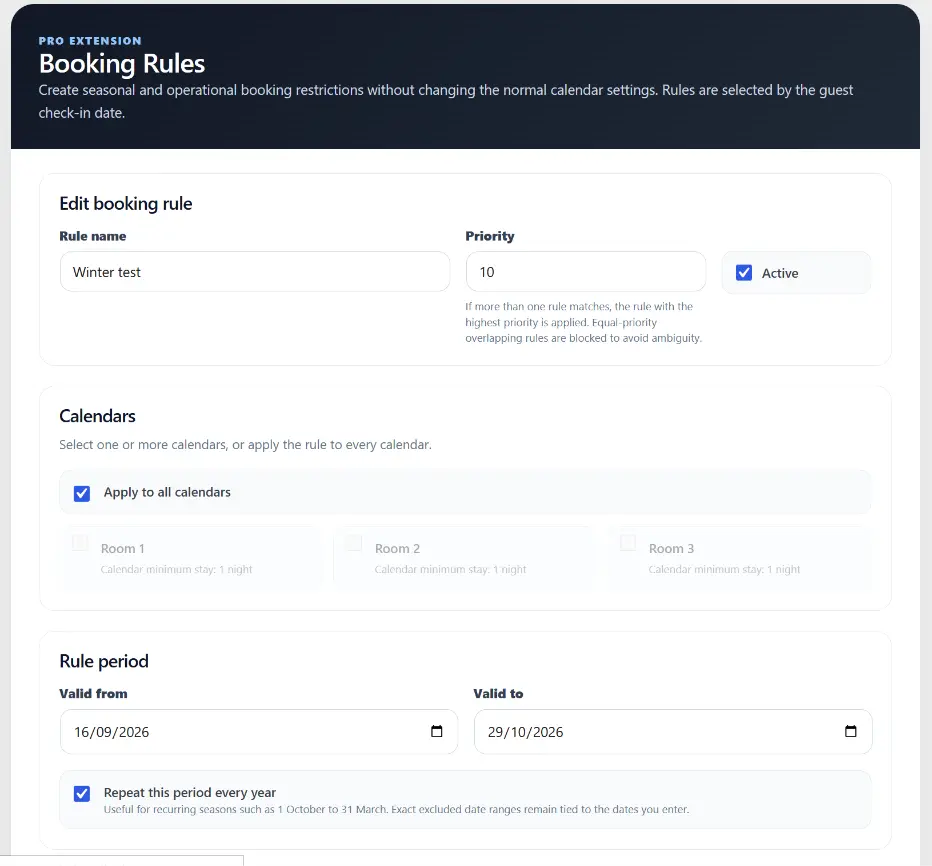
Create Booking Rules for Specific Periods
Each Booking Rule can be assigned to one or more calendars and have its own start and end date.
For example, you can create a rule valid:
from October 1 to March 31
and define that only specific arrival and departure days are allowed during that period.
At the end of the period, the calendar automatically returns to the standard Booking Engine settings.
Rules can also be configured to repeat automatically every year, making them ideal for high season, low season, or recurring periods with specific stay conditions.
Choose Allowed Check-in Days
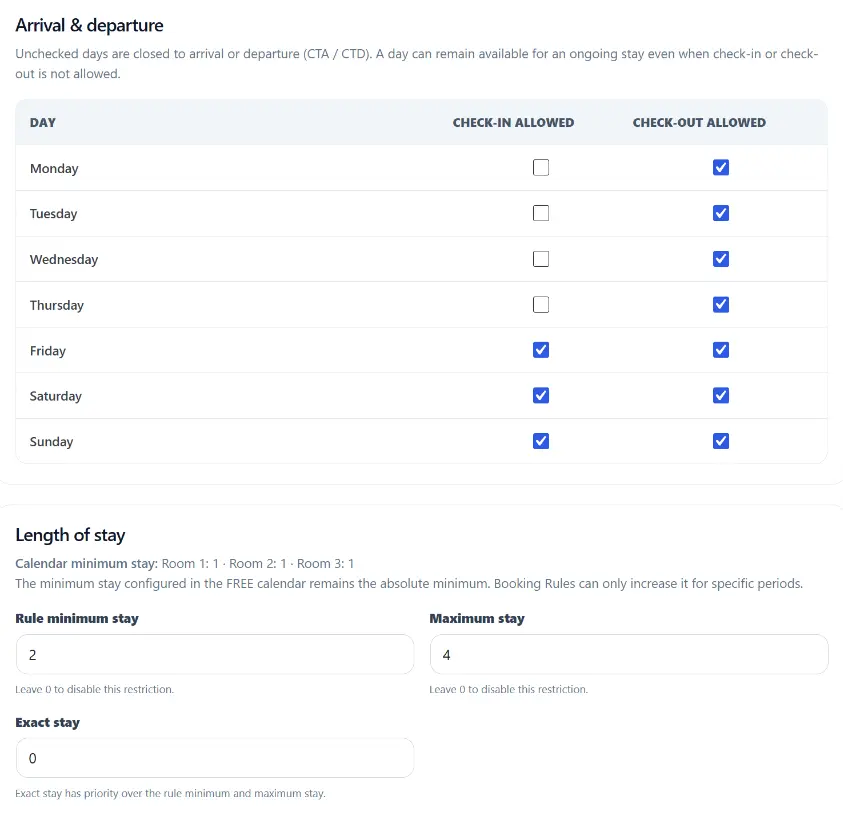
Decide exactly which days of the week guests can start their stay.
For example, you can allow:
- check-in only on Fridays;
- arrivals on Thursdays and Fridays;
- check-in only on Saturdays during high season;
- different arrival days depending on the time of year.
Dates that do not meet the configured rules are automatically managed by the Booking Engine.
Set Allowed Check-out Days
Booking Rules also allows you to define when guests can end their stay.
You can create configurations such as:
Check-in: Thursday or Friday Check-out: Sunday
This makes it easy to create weekend packages or stays with predefined arrival and departure days.
Closed to Arrival and Closed to Departure
Do you need to prevent arrivals on a specific day without making that date completely unavailable?
With Closed to Arrival and Closed to Departure rules, you can control arrivals and departures separately.
A date can therefore remain available during a stay while still being unavailable as a check-in or check-out date.
Manage Length of Stay
Each rule can modify the conditions related to the number of nights.
You can configure:
- minimum stay;
- maximum stay;
- exact number of nights;
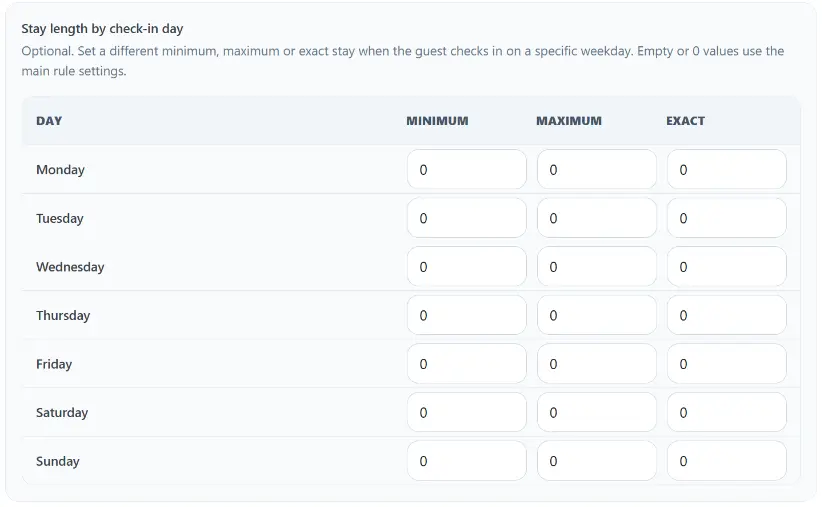
- specific stay length based on the check-in day.
For example:
Thursday check-in → 3 nights Friday check-in → 2 nights
The general minimum stay configured in the Booking Engine continues to apply, while Booking Rules allows you to create more specific conditions for selected periods.
Seasonal Rules Without Constantly Changing the Calendar
You no longer need to manually change your Booking Engine settings every time the season changes.
You can prepare your rules in advance for:
- high season;
- low season;
- weekends;
- holiday periods;
- weekly stays;
- periods with predefined arrival and departure days.
The system automatically applies the correct rule based on the configured dates.
Exclude Specific Periods
A seasonal rule does not necessarily need to apply throughout the entire date range.
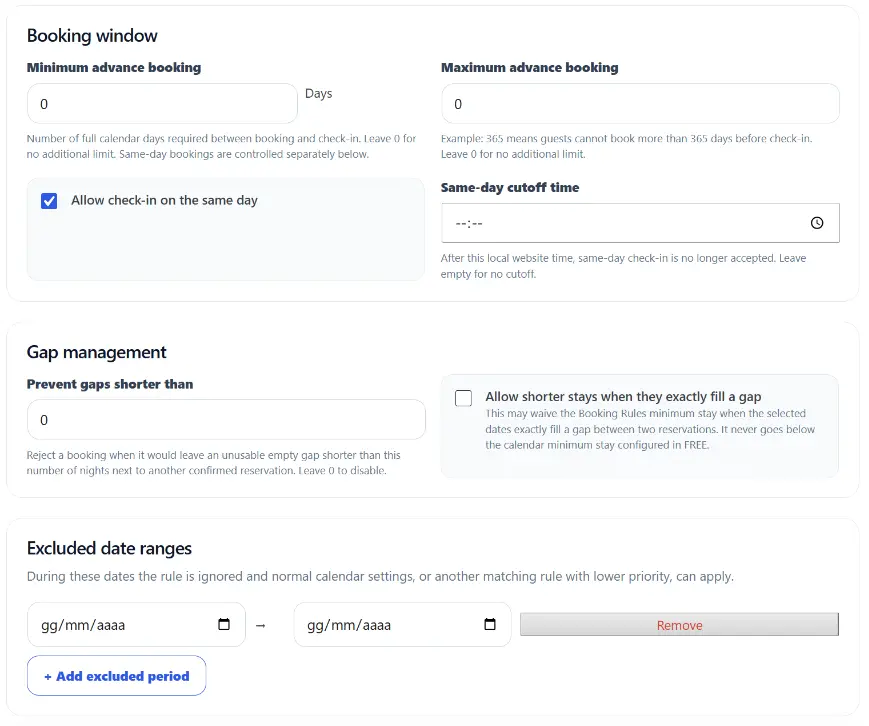
You can add one or more exclusion periods.
For example, you can create a rule valid from October to March while automatically excluding Christmas, New Year, or other special periods.
During excluded dates, the standard booking conditions are restored, or other Booking Rules can be applied.
Minimum and Maximum Booking Window
Control how far in advance guests can make a booking.
For example, you can define:
- bookings must be made at least 2 days before arrival;
- bookings can be made up to 365 days in advance;
- no last-minute bookings;
- same-day bookings allowed.
Same-Day Bookings with a Cut-off Time
If you accept last-minute bookings, you can also define a daily cut-off time.
For example:
Same-day bookings allowed until 6:00 PM.
After the configured time, check-in for that day will no longer be available.
Smart Gap Management Between Bookings
Small empty gaps between two stays can reduce property occupancy.
Booking Rules includes dedicated tools for managing gaps between bookings, helping you prevent combinations that would leave difficult-to-sell empty periods.
You can also allow exceptions to the minimum stay when a booking perfectly fills an available gap between two existing stays.
Apply One Rule to Multiple Calendars
Managing multiple apartments or rooms?
A Booking Rule can be applied to:
- a single calendar;
- multiple calendars;
- all compatible calendars.
This means you do not need to manually recreate the same configuration for every property.
You can also quickly duplicate a rule and then modify it for another calendar or period.
Priority and Conflict Management
When multiple rules are used, Host Domination Booking Rules automatically checks for overlaps and allows you to manage the priority of different conditions.
This reduces the risk of incompatible configurations and makes it easier to organize complex seasonal rules.
Designed for Direct Bookings
Host Domination Booking Rules is designed for users who receive direct bookings through their own website without OTA commissions and need greater control over availability.
It is particularly useful for:
- vacation rentals;
- B&Bs;
- guest houses;
- holiday apartments;
- residences;
- small hotels;
- property managers with multiple calendars.
More Control Over Bookings Without Complicating Your Calendar
With Host Domination Booking Rules, you can transform standard calendar settings into a flexible system of seasonal and custom booking rules, while keeping availability management organized and separate.
Create your rules, choose when they should apply, and let the Booking Engine automatically manage check-in, check-out, and length of stay.
Host Domination Booking Rules requires Host Domination Booking Engine PRO.