05/10/2026
★★★★☆
Excellent feature for direct booking websites. Guests pay the deposit first and the remaining amount closer to check-in.
Accept an accommodation deposit via Stripe, with a specific deposit amount for each calendar, and clearly display the remaining balance.
After purchase, you will receive the add-on package and license key via email.




Requiring the full booking amount upfront can discourage guests, especially when they are planning an expensive stay or booking several months in advance. Host Domination Deposit Payments gives you a more flexible way to secure bookings by allowing guests to pay only a percentage of the accommodation price at the time of booking.
Designed exclusively for Host Domination Booking Engine PRO, this WordPress add-on allows you to create deposit rules for each individual calendar and also choose how the remaining balance should be managed.
You can decide whether the balance should be:
This allows you to adapt the payment plan to the needs of each accommodation and provide guests with clear payment conditions from the moment they book.
Instead of requiring the full amount immediately, you can offer a simpler and more reassuring experience: pay a deposit today and manage the remaining balance according to the property's payment terms.
Guests are often more likely to book directly when the initial payment is more affordable and the payment terms are clearly explained.
A flexible deposit can reduce the financial commitment required at the time of booking, especially for:
Host Domination Deposit Payments helps you provide the flexibility guests expect while still securing the booking through a real Stripe payment.
The guest confirms the booking by paying the required deposit, while you retain full control over the required percentage, the balance due date, and the method used to collect the remaining amount.
Not every accommodation requires the same payment conditions.
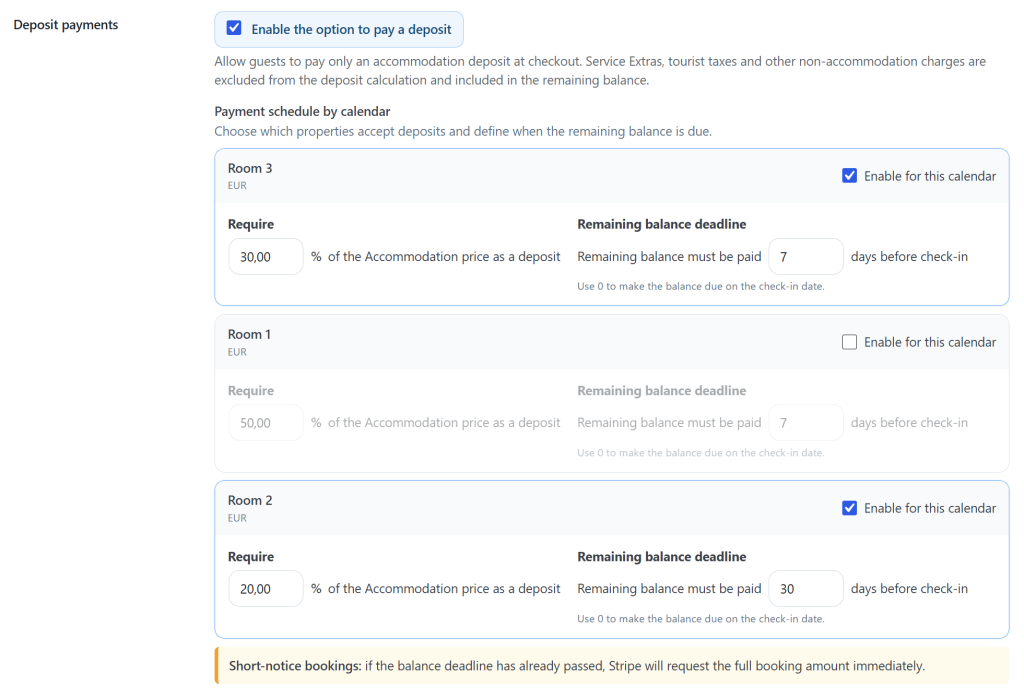
A luxury apartment may require a higher deposit, while a smaller room or shorter stay may require a lower percentage. For this reason, Deposit Payments allows you to configure rules individually for each calendar.
From the Payments section of Host Domination Booking Engine PRO, you can:
This calendar-specific system is ideal for property managers and hosts who manage multiple rooms, apartments, villas, or vacation rentals from the same WordPress website.
For example, you can require automatic balance collection 7 days before arrival for one property and allow cash payment at check-in for another.
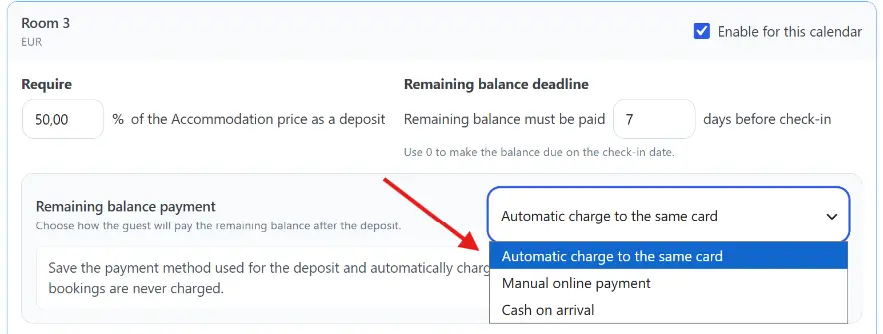
Deposit Payments does more than simply divide the booking amount between a deposit and a balance. You can also decide how the remaining amount should be collected automatically or manually.
The customer pays the deposit through Stripe, and the payment method is prepared for the remaining balance.
For example, you can specify that the remaining balance should be charged automatically 7 days before check-in.
On the scheduled date, Deposit Payments automatically attempts to collect the remaining amount without requiring the customer to repeat the booking process.
If the booking is cancelled before the due date, the scheduled automatic charge is not processed.
If the bank requires additional authentication or the payment cannot be completed automatically, the customer can be directed to a secure online payment to complete the remaining balance.
You can choose not to process any automatic charge.
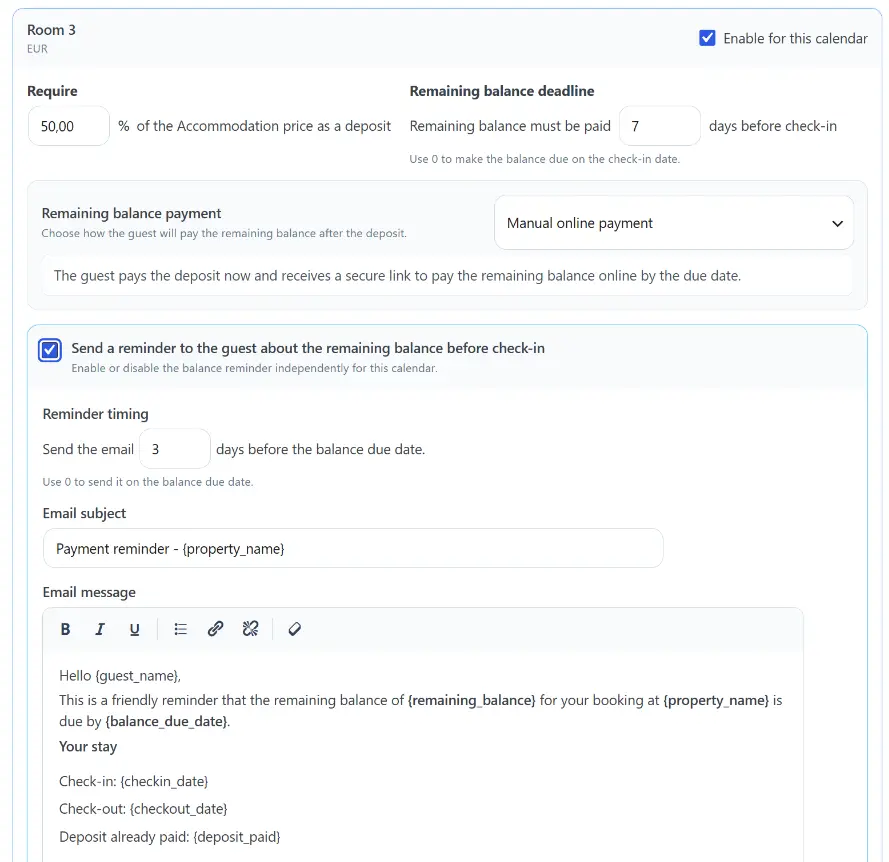
The customer pays the deposit normally during the booking process and later receives a secure Stripe link to pay the remaining balance.
The link can be included in booking communications and payment reminders.
This option allows the property to set a precise due date while keeping the final payment under the customer's control.
If you prefer to collect the remaining balance directly at the property, you can choose Cash on Arrival.
The customer pays only the required deposit online. The remaining amount is clearly displayed as the balance due upon arrival.
In this mode:
This allows you to use Deposit Payments even when your property prefers to collect part of the booking amount online to secure the reservation and the remainder directly upon arrival.
A booking total can include several different charges. In addition to the accommodation rate, guests may select cleaning services, breakfast, pet fees, transfers, or other Service Extras.
Deposit Payments keeps the calculation clear by applying the selected percentage exclusively to the Accommodation amount.
Tourist taxes, Service Extras, and other additional charges are excluded from the deposit calculation base.
Suppose a booking includes:
The deposit is calculated exclusively on the €500 accommodation amount:
€500 × 30% = €150 deposit
The guest pays €150 when confirming the booking. The remaining balance is €430, including the unpaid portion of the accommodation and the additional services.
The €430 balance will then be managed according to the method selected by the host: automatic charge, manual online payment, or payment upon arrival.
This prevents extra services and local charges from artificially increasing the deposit amount and provides both the host and the guest with a more transparent payment breakdown.
Clarity is essential when accepting partial payments.
Guests should always know:
Deposit Payments displays this information directly during the booking and payment process.
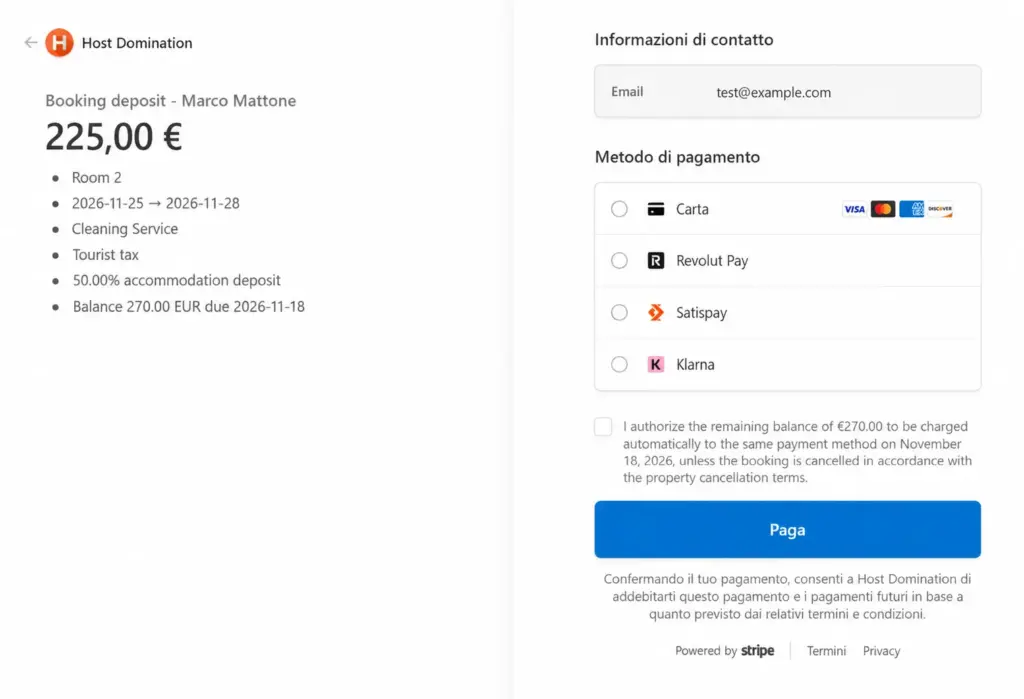
Before proceeding to Stripe, the guest can see the deposit amount to be paid and the balance that will remain after the payment.
Once the deposit has been successfully paid, the summary can clearly display:
Deposit paid: €150 Remaining balance: €430 Balance method: Automatic card charge Scheduled date: 10/10/2026
or:
Deposit paid: €150 Remaining balance: €430 Balance method: Cash on arrival
No unclear calculations and no unexpected payment conditions after the booking has been confirmed.
Deposit Payments works with the Stripe integration available in Host Domination Booking Engine PRO.
When a deposit rule is applied, the add-on automatically adjusts the Stripe Checkout amount so that the guest pays only the configured accommodation deposit instead of the full booking total.
When Automatic Charge mode is used, the initial payment can also prepare the payment method for the remaining balance.
The Stripe payment description includes important booking information such as:
This creates a consistent payment record and makes it easier to understand what each transaction refers to when reviewing payments in Stripe.
The payment experience does not end when the guest leaves Stripe.
After the deposit has been successfully paid, the booking confirmation clearly distinguishes between the amount already paid and the amount still outstanding.
This information is also included in the confirmation email.
The confirmation can display:
If the balance is charged automatically, the customer is informed of the scheduled date.
If the balance must be paid manually online, the customer can receive the corresponding payment link.
If the balance must be paid in cash, it is clearly indicated that the remaining amount will be due directly upon arrival.
Deposit payments should not be available when the balance payment deadline has already passed.
For example, if your rules require the balance to be paid or charged seven days before arrival, a guest booking only three days before check-in should not be able to use that specific partial-payment option.
Deposit Payments automatically checks the balance due date before applying partial payment.
When required by the configured rules, bookings made too close to the arrival date continue to use the standard full-payment checkout.
This prevents guests from confirming last-minute bookings with a balance that is already overdue.
Host Domination Deposit Payments is suitable for many types of accommodation businesses, including:
Whether you manage a single apartment or multiple accommodation calendars, you can create payment conditions that suit your business model.
Flexible deposits can make your direct booking website more competitive compared with OTAs and major booking platforms.
Guests gain greater payment flexibility while you continue to secure every booking through your own website.
With Deposit Payments, you can:
The result is a simpler booking process for guests and a much more flexible payment system for the accommodation provider.
Deposit Payments integrates directly into the payment settings of Host Domination Booking Engine PRO.
There is no separate platform to manage and no need to learn how to use an external booking dashboard.
To configure the add-on:
The configured rules are then automatically applied to eligible bookings.
This add-on is designed specifically for the Host Domination ecosystem and directly uses the booking information already managed by Booking Engine PRO.
It uses the booking calendar, accommodation amount, arrival date, Stripe payment settings, and customer email information already available in your booking system.
There is no need to create duplicate properties, reconnect calendars, or manage payment rules through a separate service.
Yes. You can choose exactly which calendars should accept deposit payments and configure different percentages for different accommodations.
No. The deposit percentage is calculated exclusively on the Accommodation amount. Service Extras, tourist taxes, and other additional charges are excluded from the deposit calculation base.
Yes. For each calendar, you can choose between automatic card charge, manual online payment, or cash payment upon arrival.
The guest pays the deposit through Stripe, and the remaining balance is scheduled to be automatically charged to the card according to the number of days before check-in configured by the host.
Yes. You can use the manual online payment mode. The customer pays the deposit at the time of booking and can later complete the remaining balance through a secure Stripe payment link.
Yes. In this case, the guest pays only the deposit online. The remaining balance is displayed as an amount to be paid directly at the property during check-in.
The automatic charge should not be processed for bookings that have been cancelled before the scheduled balance date.
If the payment cannot be completed automatically or the bank requires additional authentication, the customer can complete the remaining balance through a secure online payment.
When the payment plan deadline has already passed, Deposit Payments can keep the standard full-payment checkout active.
Yes. The booking and payment summaries clearly display the deposit paid, the amount still outstanding, and the selected balance payment method.
Yes. After the deposit has been successfully paid, the confirmation sent to the customer includes the essential payment breakdown and information about the remaining balance.
Yes. Deposit Payments is designed to work with the Stripe integration available in Host Domination Booking Engine PRO.
Yes. Each calendar can have its own deposit percentage, due date, and balance management method.
A direct booking should be simple, secure, and transparent.
With Host Domination Deposit Payments, guests can confirm their stay without having to pay the full booking amount immediately.
You can create different deposit rules for each accommodation and freely choose how to manage the remaining balance: automatic card charge, manual online payment, or cash payment upon arrival.
Protect last-minute bookings, keep Service Extras outside the deposit calculation, and clearly communicate every amount due to the customer.
Add flexible deposit payments to your WordPress booking system and make your direct booking experience more competitive, professional, and suited to the needs of your property.
Excellent feature for direct booking websites. Guests pay the deposit first and the remaining amount closer to check-in.
The deposit and balance workflow is clear for both the host and the guest. Setup was straightforward.
Easy to configure the deposit percentage and payment schedule. Very practical for direct bookings.
Being able to collect a booking deposit online has improved our direct reservation process considerably.
The automatic balance payment before check-in is exactly what we needed for our holiday rental website.
Very useful WordPress booking add-on for collecting booking deposits instead of requiring the full payment immediately.
Deposit payments made direct bookings much easier to manage. Guests can pay a percentage upfront and the balance later.