
To connect a Self Check-in at the State Police Web Lodged Portal, you need to get a special access key called Web Service Key (WSKEY).
This key allows compatible software to communicate with the Police Headquarters portal and, if provided for by the service used, to automatically transmit guest cards.
In this guide we will see how to access Alloggiati Web, find the Web Service Key and generate it in a few simple steps.
1. Log in to the Lodged Web Portal
First, visit the official website of the State Police:
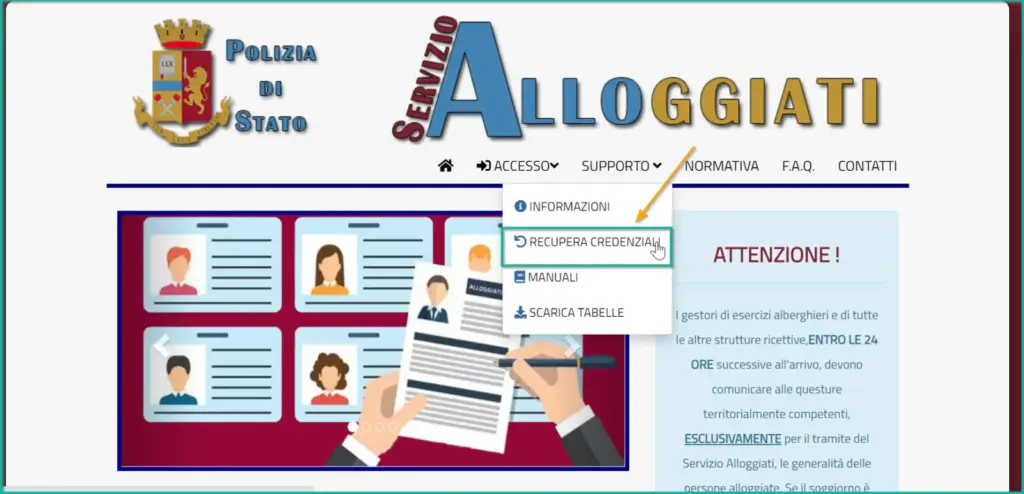
From the home page:
- Click on the menu Access.
- Select the item Codes.
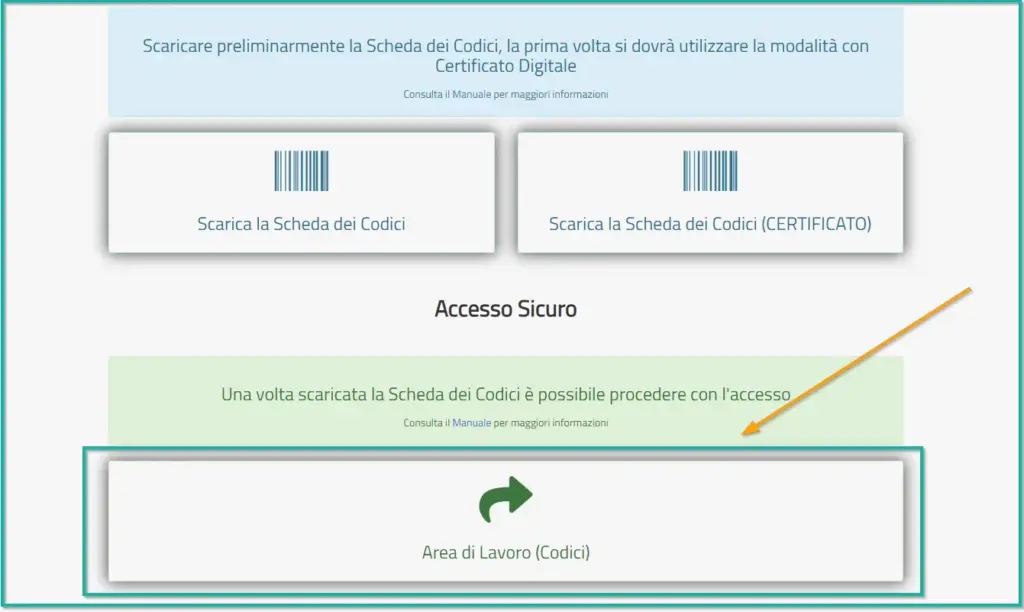
- On the next screen, click Workspace (Codes).
2. Enter your credentials
On the login screen you will have to enter:
- Username provided by the Police Headquarters.
- Password associated with your Lodged Web account.
Click Log in to continue.
The system will require verification through your Security Code Sheet, consisting of 16 number groups.
Follow the on-screen prompts and enter only the required digits in the respective fields. Once the verification is complete, you will enter your reserved area.
3. Open the Web Service Key section
After logging in:
- Locate yours username, at the top right of the page.
- Click on the username to open the menu.
- Select Key Web Service.
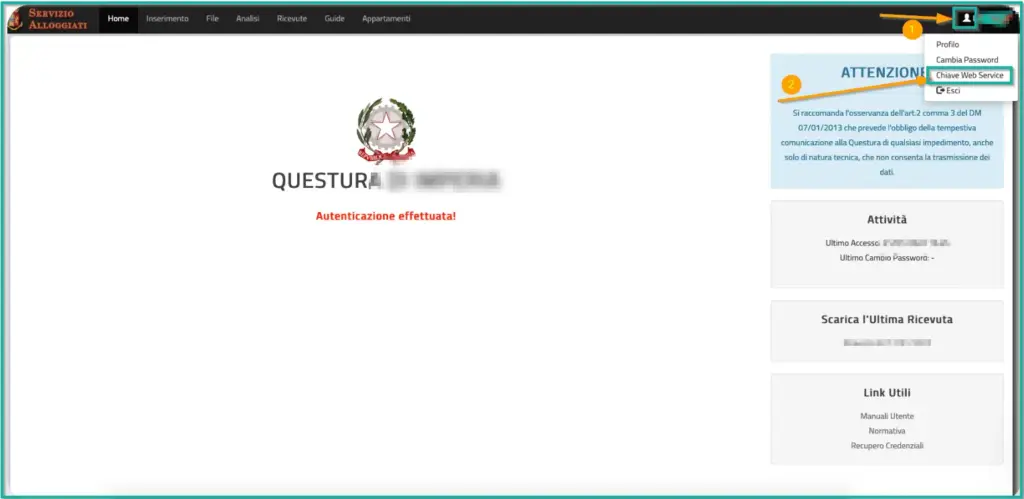
A window dedicated to managing your key will open.
4. Generate your Web Service Key (WSKEY)
In the Web Service Key You will find the field containing the code used to connect via web services.
If you don’t have a key available yet, click:
Generate New Code
The system will generate an alphanumeric key, called WSKEY.
Important: If you already have a valid key in the window, you can copy it without generating a new one.
The portal allows you to generate only one new code per day. In addition, each time you change your Web Lodging password, you will need to generate a new WSKEY.
5. Copy the key and use it in your Self Check-in software
Once you have the key:
- Select and copy the entire WSKEY code.
- Log in to your Self Check-in software panel.
- Look for the section dedicated to integration with Lodged Web / State Police.
- Paste the key into the key field.
- Save your settings.
If your software supports integration, it can use WSKEY to communicate with the portal according to the intended functionality.
Do not share your WSKEY publicly: is a confidential credential of your accommodation.
Don’t have the Security Code Sheet yet?
If you are still using old ways of logging in and don’t have the Codes Card, you need to retrieve it first.
From the Lodged Web portal:
- Select Support → Recover Credentials.
- Follow the steps available to retrieve or download the Code Card.
- If you are still using a valid digital certificate and the portal offers the option to do so, you will be able to download the codes using the certificate.
- Keep the Code Card in a safe place.
The recovery methods depend on the credentials you still have. If you are unable to complete the procedure, contact the competent Police Headquarters.
Frequently Asked Questions
Is the Web Service Key free?
Yes. The WSKEY generation takes place directly on the official Lodged Web portal, at no additional cost.
Do I have to generate a new key every time I log in?
No. The key that has already been generated can be reused. A new one must be generated if the password is changed or when the old one needs to be replaced.
Is WSKEY the same as Security Codes?
No. I Security Codes are used to authenticate you on the portal, while the WSKEY allows compatible software to use Alloggiati’s web services.
Does WSKEY allow you to send the tickets automatically?
The WSKEY allows authentication to web services, but the automatic sending depends on the functionality of the connected software. It is important to verify that the transmission has actually been successful and to keep the relevant receipts.
I can’t find the Web Service Key item. What can I do?
Verify that you are logged in via Workspace (Codes). If the item does not appear, consult the assistance of the portal or contact the relevant Police Headquarters.
For more information, please consult the Official portal Lodged Web and the related user manual.