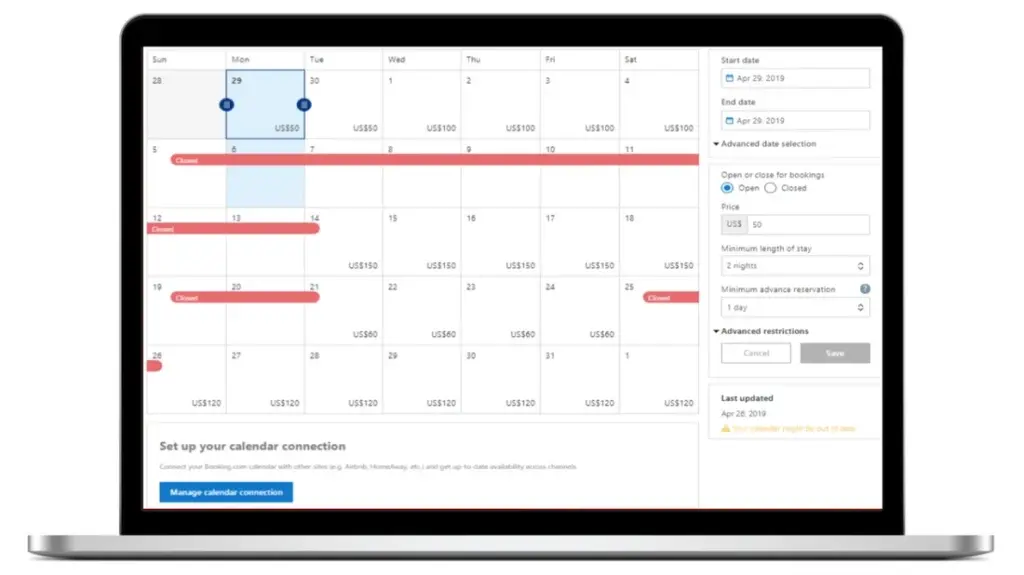

You have connected the Airbnb calendar in Booking.com via iCal, but a booking doesn’t appear? Or have you blocked certain dates on one platform and they still appear available on the other?
It is a fairly common problem when using iCal link to sync Airbnb, Booking.com, Google Calendar, or your website’s calendar.
The first thing to know is that iCal is not an instant sync. The link allows the different platforms to periodically read an external calendar, but there may be an interval between a change and the moment it is received by the other systems.
However, if your calendar still doesn’t update, the problem may be due to the link configuration, an incorrect import, or a synchronization set in one direction only.
In this guide we see why the iCal Airbnb or Booking.com calendar is not updating and what to check to fix the problem.
What is iCal Sync
iCal, also called iCalendar, is a standard used to share calendar information between different services.
Airbnb, Booking.com and numerous software for accommodation facilities allow you to generate a iCal link, usually associated with a .ics.
The operation can be represented as follows:
Airbnb → link iCal → Booking.com
Booking.com periodically reads the Airbnb calendar and uses the information received to block out busy dates.
The same procedure can be carried out in the opposite direction:
Booking.com → iCal links → Airbnb
To have a truly two-way synchronization between the two platforms, it is therefore normally necessary to configure both connections.
Why is my Airbnb or Booking.com calendar not updating?
There can be several causes.
Let’s see the most frequent ones.
1. iCal sync is not immediate
It is probably the most common cause.
When a booking is made on Airbnb, the Airbnb calendar is updated immediately within the platform.
However, if Booking.com are importing that calendar through an iCal link, they must first reread the feed.
The flow is therefore:
New Airbnb booking
↓
Airbnb calendar update
↓
Updating the iCal feed
↓
Booking.com reads the feed again
↓
The date is blocked on Booking.com
There can be a delay between these steps.
This means that you see a reservation on Airbnb but not immediately find it on Booking.com does not necessarily indicate that the connection is broken.
Can I force the update?
When available, you can use the Updating or importing your calendar manually on the platform that is importing the feed.
If the manual update correctly detects the new booking, the iCal link is probably working and the problem was simply related to the synchronization interval.
2. You have configured synchronization in one direction only
This error is very common.
Let’s say you’ve only configured:
Airbnb → Booking.com
In this case, Booking.com can read the reservations on Airbnb.
But a booking received on Booking.com is not automatically sent to Airbnb, because the reverse connection is missing.
To synchronize the two calendars, you must verify that you have configured:
Airbnb → Booking.com
e
Booking.com → Airbnb
In other words:
Airbnb ⇄ Booking.com
Each platform exports its own calendar and imports the other’s.
Example
On Airbnb:
- export the Airbnb calendar;
- copy the iCal link;
- import that link on Booking.com.
Later on Booking.com:
- export the calendar Booking.com;
- copy the relevant iCal link;
- you go back to Airbnb;
- import calendar Booking.com.
Only after you have completed both connections will you have a synchronization in both directions.
3. The iCal link entered is incorrect
Another common cause is a Incorrect or incomplete iCal URL.
When copying the calendar, make sure to use the link generated by the feature:
Export calendar
And not simply the address of the calendar page visible in the browser.
An iCal link is a specific address used by software to read your calendar.
In many cases, it is associated with a file in the following formats:
.ics
If you paste an incorrect URL, the platform may fail to retrieve bookings.
What To Do
Go back to the source platform and:
- Open the calendar of the correct structure;
- Search Calendar synchronization, Export calendar or an equivalent item;
- copy the iCal link again;
- check the calendar imported on the other platform;
- If necessary, delete the old link and import it again.
4. You exported the wrong accommodation calendar
If you manage multiple apartments or rooms, pay special attention to this point.
Each accommodation can have its own calendar.
You may have accidentally set up:
Airbnb Apartment A → Booking.com Apartment B
The connection technically works, but the bookings are applied to the wrong calendar.
To avoid this problem, it is useful to assign recognizable names to imported calendars, such as:
- Airbnb – Apartment Rome Center
- Booking.com – Apartment in the center of Rome
- Airbnb – Room 1
- Booking.com – Bedroom 1
This makes it much easier to figure out which feed is feeding each calendar.
5. The booking is too recent
If you’ve just received a booking, avoid deleting all connections immediately.
First check if the problem is simply due to the time needed for the platform to re-read the iCal feed.
You can take a simple test:
- check that the booking is on the original platform;
- Check that the exported calendar is still connected.
- perform a manual update, if available;
- Check back after the next sync.
If, on the other hand, the reservation still does not appear after several updates, it is worth checking the link.
6. You deleted or replaced the old calendar
iCal links can be regenerated or replaced.
If you changed the calendar configuration on the original platform, the link you previously imported may no longer be the correct one.
In this case, the simplest solution is often:
Remove the old link → export the calendar again → import the new link.
Before you do that, however, carefully check which calendar you’re eliminating, especially if you manage multiple properties.
7. Dates are blocked but there is no reservation
The problem can also occur in reverse.
You open Airbnb and find some blocked dates, but you don’t find any new bookings.
It doesn’t necessarily mean that there is an error.
A date can be unavailable for several reasons:
- booking imported from an external calendar;
- manual locking;
- availability rules;
- preparation time between two stays;
- check-in or check-out restrictions;
- connection with another calendar.
If you use multiple external calendars, it is therefore important to check What source the block came from.
How to tell if the iCal link is working
You can carry out a very simple check.
Take the iCal link you exported and check that it is correctly recognized by the platform that needs to import it.
So check:
- that the calendar is still connected;
- that there are no error messages;
- that the link belongs to the correct structure;
- that there are recent bookings;
- that the import is active.
If your platform has a Refresh, Sync, Import now or similar, use it to make an immediate verification.
Airbnb calendar not updating on Booking.com: what to do
If the issue is specific to this link:
Airbnb → Booking.com
First, check the calendar exported from Airbnb.
The general procedure is:
- log in to Airbnb;
- select the ad;
- open the calendar;
- enter the settings relating to availability or linked calendars;
- locate the function to export the calendar;
- copy the iCal link;
- log in to the Extranet Booking.com;
- Open the section dedicated to calendar synchronization;
- check that the Airbnb calendar is still connected;
- If necessary, import the link again.
Also remember that Airbnb and Booking.com interfaces can change over time, so the exact names of the sections may vary.
Calendar Booking.com not updating on Airbnb
If your Booking.com bookings don’t appear on Airbnb, you need to check the opposite route:
Booking.com → Airbnb
In this case:
- log in to the Extranet Booking.com;
- locate the calendar sync feature;
- copy the calendar export link Booking.com;
- log in to Airbnb;
- select the correct ad;
- Open the calendar settings;
- choose the function to import an external calendar;
- paste the link Booking.com;
- give the calendar a recognizable name;
- Save.
The link must be set up on the Airbnb property that corresponds to the same listing on Booking.com.
Airbnb and Booking.com are synchronized but the dates do not coincide
In this case, it is necessary to identify which system has the correct information.
Suppose that:
- Airbnb shows October 10-15 busy;
- Booking.com monsters October 10-15 available.
First, check where the original reservation is.
If the reservation is from Airbnb, the route to check will be:
Airbnb → Booking.com
If, on the other hand, it comes from Booking.com:
Booking.com → Airbnb
This approach allows you to find the link that is not working much more quickly.
Does iCal also sync prices and rates?
Here it is important to distinguish the Calendar synchronization from the complete management of channels.
iCal is primarily used to transfer information related to calendar events and occupancy.
It should not be considered equivalent to a true Channel Manager capable of centrally managing elements such as:
- prices;
- rates;
- restrictions;
- advanced availability;
- minimum stay;
- inventory;
- trading rules.
So you can have:
calendars synced via iCal
but at the same time:
different prices between Airbnb and Booking.com.
It’s not necessarily a mistake.
Can iCal avoid overbookings completely?
iCal synchronization can greatly reduce the risk of double bookings, but you should be aware of its main limitation:
The update is not necessarily instantaneous.
Let’s imagine this scenario:
20:00 – a guest books on Airbnb
20:01 – Booking.com hasn’t updated the Airbnb feed yet
20:03 – a second guest finds the same available dates on Booking.com
Theoretically, an overlap can be created.
The more bookings, properties and platforms used increase, the more important this limit becomes.
For facilities with simple management, iCal can be an extremely convenient solution.
For more complex configurations, it may be useful to evaluate a Channel Manager or a more advanced software connection.
iCal and Channel Manager are not the same thing
This distinction is important.
iCal
It is especially ideal for synchronizing calendars and busy dates between compatible systems.
Channel Manager
It is designed to centralize the distribution of the structure across multiple channels and can synchronize a greater number of information.
In general:
| Function | iCal | Channel Manager |
|---|---|---|
| Busy Date Synchronization | ✅ | ✅ |
| Airbnb ↔ Booking.com | ✅ | ✅ |
| Necessarily instant update | ❌ | More advanced |
| Price synchronization | ❌ | ✅ |
| Restrictions Manager | Limited | ✅ |
| Management of numerous channels | Limited | ✅ |
| Easy setup | ✅ | Depends on the software |
The best solution therefore depends on the number of facilities and the complexity of management.
Sync Airbnb and Booking.com with your website too
If you receive Airbnb and Booking.com in addition to Airbnb and Direct bookings from your website, that calendar must also be considered.
The configuration can become:
Airbnb → website
Booking.com → site
and at the same time:
Airbnb → website
→ Booking.com website
This allows bookings from different channels to contribute to the availability shown on your Booking Engine.
For WordPress, Host Domination Booking Engine allows you to create an availability calendar on your site and import external calendars via iCal/ICS from Airbnb, Booking.com, and other compatible platforms.
In this way you can also add a channel to receive OTAs Direct bookings from your website.
👉 Find out Host Domination Booking Engine:
https://hostdomination.com/booking-engine/
Checklist: What to check if iCal is not updating
If your Airbnb or Booking.com calendar isn’t syncing, check these points in order:
- Does the reservation really exist on the origin calendar?
- Is the external calendar still connected?
- Did you use the correct iCal link?
- Have you connected the correct accommodation?
- Is synchronization configured in both directions?
- Have you tried a manual update?
- Does the problem affect only one reservation or all of them?
- Has the old iCal link been modified or regenerated?
- Is the date blocked by a reservation or by an availability rule?
- Are you trying to sync information that iCal doesn’t handle, such as rates?
Following this sequence usually allows you to quickly identify where the synchronization stops.
Frequently Asked Questions
Why is Airbnb not syncing with Booking.com?
The most common causes are a delay in updating the iCal feed, a wrong link, a calendar associated with the wrong structure, or a synchronization configured only in one direction.
How long does it take for iCal to update?
There is no universal time that applies to all platforms. The calendar is updated according to how and how often the service importing the feed synchronizes. For this reason, iCal should not be considered a connection that is necessarily instantaneous.
Can I manually update my calendar?
It depends on the platform used. Some services allow you to manually request a new import of the external calendar.
Why doesn’t a Booking.com reservation appear on Airbnb?
Check that the Booking.com calendar has been exported and then imported into the correct Airbnb listing. If you’ve only set up Airbnb → Booking.com, bookings Booking.com can’t automatically use that link to return to Airbnb.
Can iCal link stop working?
You may need to replace or reconfigure a link if the feed has been modified, deleted, or regenerated. If you have persistent issues, you should verify the link directly from the source platform.
Does iCal sync Airbnb and Booking.com prices?
No. iCal synchronization is not the same as a complete synchronization of rates. A more advanced system, such as a Channel Manager, is normally required for centralized management of prices, restrictions and distribution across channels.
Does iCal prevent overbookings?
It helps to greatly reduce risk because it allows you to share busy dates, but the update may not be instantaneous. With many bookings or numerous channels, it is therefore advisable to consider a solution with more advanced synchronization.
Conclusion
If iCal Airbnb or Booking.com not updating, does not necessarily mean that synchronization is permanently compromised.
In most cases, four elements must be checked:
Correct link → correct accommodation → synchronization in both directions → update times.
For easy management, iCal remains a very useful tool for connecting Airbnb, Booking.com, and other calendars.
However, when the number of properties, the platforms used or the frequency of bookings increase, the limitations of a synchronization based solely on calendar feeds must be considered.
If, on the other hand, you want to add to your ecosystem also the direct bookings from your WordPress site, you can use Host Domination Booking Engine to create an availability calendar and connect external calendars via iCal/ICS.
👉 https://hostdomination.com/booking-engine/
Recommended SEO settings
SEO Title:
iCal Airbnb or Booking.com not updating? Causes and solutions
Meta description:
Airbnb iCal calendar or Booking.com not updating? Learn about the most common causes, how to check iCal links, and fix sync issues.
Slug:ical-airbnb-booking-non-si-aggiorna
Main keyword:
iCal Airbnb Booking is not updating
Secondary keywords:
- calendar Airbnb is not updating
- Booking.com not syncing
- iCal won’t update
- Airbnb Booking sync not working
- Booking calendar not updating
- Airbnb Booking calendar not synced
- iCal sync issues
- iCal link not working
- Airbnb booking does not appear on Booking
- Booking Booking does not appear on Airbnb
Recommended category:
Resources for Airbnb → Hosts / Booking.com
Excerpt:
Airbnb calendar or Booking.com not updating via iCal? Let’s look at the most common causes, how to check connections, and what to do when blocked bookings and dates aren’t syncing.