
You just received a reservation on Airbnb but Booking.com still shows the same available dates? Or have you connected a calendar to Google Calendar and after several hours the new booking still hasn’t appeared?
The cause could be very simple: iCal doesn’t necessarily work in real-time.
When you connect Airbnb, Booking.com, Google Calendar, or your site’s calendar through an iCal link, the platform that receives the calendar should periodically check the feed for new bookings, cancellations, or changes.
But Each platform uses different update times.
In this guide we see how long does it take for iCal to update on Airbnb, Booking.com, and Google Calendar, because delays can occur, and when syncing via calendar may not be enough.
How long does it take for iCal to update?
There is no single update time that applies to all iCal calendars.
The key point to understand is this:
The sync time depends mainly on the platform that imports the calendar.
Let’s imagine you export your Airbnb calendar to another service:
Airbnb → iCal link → external platform
Airbnb makes the information available in its calendar, but the external platform will decide when to check the iCal link again.
The same is true in the reverse path:
Booking.com → iCal → Airbnb
In this case, it is Airbnb that has to periodically reread the Booking.com calendar.
For this reason, the same calendar may appear updated on one platform but still old on another.
iCal update times: Airbnb, Booking.com and Google Calendar
As a practical reference:
| Platform that imports the calendar | iCal Update |
|---|---|
| Airbnb | about every 3 hours |
| Booking.com | Periodic update, not in real time |
| Google Calendar | variable, often several hours and potentially up to about 24 hours |
| Booking Engine / External Software | It depends on the software used |
The important thing is not to consider any of these links equivalent to a real-time API synchronization.
However, let’s see each platform in detail.
How often does Airbnb update iCal calendars?
Airbnb currently indicates that imported external calendars are automatically updated every 3 hours.
This means that if you connect:
Booking.com → Airbnb
Airbnb will periodically check the Booking.com calendar and import new information.
Airbnb also allows you to request a manually updating the linked calendar.
So, if you just received a reservation on Booking.com and it still doesn’t appear on Airbnb, you can check the linked calendar and manually request a new update.
Example
Booking received on Booking.com:
2:00 p.m. → Booking.com reservation
↓
Booking.com updates their calendar
↓
Airbnb has not yet carried out the new check
↓
Hours later, → Airbnb reads the feed again
↓
Dates are also blocked on Airbnb
The fact that at 14:05 the reservation is not yet visible on Airbnb does not necessarily mean that the synchronization does not work.
How to manually update your calendar on Airbnb
If you don’t want to wait for the next automatic update, you can manually check the imported calendar.
The process may vary slightly with UI updates, but generally you should:
- access Airbnb;
- open Calendar;
- select the relevant ad;
- open the free/busy settings;
- identify the connected calendars;
- select the external calendar;
- Use the Update calendar.
Airbnb also shows the last time each linked calendar was updated.
This information is very useful to understand if the problem is with the feed or simply the time that has passed since the last synchronization.
How often Booking.com update the iCal calendar?
Also Booking.com allows you to synchronize external calendars through iCal connections for compatible facilities and configurations.
The principle is the same:
Airbnb → link iCal → Booking.com
Booking.com must periodically re-import your Airbnb calendar.
The update then should not be considered instantaneous.
In some extranet configurations, you may also have a function to manually perform a new import of the linked calendar.
What does this mean in practice?
If you receive an Airbnb reservation at 6:00 p.m., you don’t necessarily have to expect that by 6:01 p.m. Booking.com has already blocked those dates.
There is an interval during which:
Airbnb = busy
but
Booking.com = still available
until the next sync.
And this is precisely one of the main limitations of iCal.
How long does it take for Airbnb to sync with Booking.com?
Here an important distinction must be made.
There is no single synchronization:
Airbnb ⇄ Booking.com
In reality, there are Two independent streams.
Stream 1
Airbnb → Booking.com
Booking.com reads the Airbnb calendar.
Flow 2
Booking.com → Airbnb
Airbnb reads the calendar Booking.com.
The two processes can update at different times.
It may therefore happen that:
Booking.com → Airbnb
is already up to date,
while:
Airbnb → Booking.com
is still waiting for the next check.
This is perfectly possible with an iCal-based synchronization.
Google Calendar: How long does it take for iCal to update?
Google Calendar deserves a separate discussion.
You can add an external calendar via URL and view it within the section Other calendars.
The problem is that Google Calendar It is not primarily designed as a real-time synchronization system for accommodation reservations.
The update of calendars subscribed via URL is automatically managed by Google and The user cannot freely choose how many minutes to update the feed.
In practice, the update can take several hours and, in some cases, arrive in the order of about a day.
This means that Google Calendar is very useful for:
- view reservations;
- have a centralized personal calendar;
- consult check-in and check-out;
- organize activities;
- have a view of appointments.
But it should not be considered the main system to avoid overbooking between OTAs.
Airbnb → Google Calendar: why doesn’t the booking appear right away?
Let’s say you configure:
Airbnb → Google Calendar
Airbnb displays its calendar.
Google must then read that feed.
The flow is therefore:
New Airbnb booking
↓
Updated Airbnb calendar
↓
Updated iCal Feed
↓
Google Calendar checks the feed again
↓
Booking visible on Google Calendar
The slowest step can be the very last one.
For this reason, a reservation can already be perfectly present on Airbnb but appear on Google Calendar only later.
Refreshing the Google Calendar page does not force iCal
This is a very common mistake.
Press:
F5
or refresh the browser page it doesn’t mean asking Google to reread the original iCal feed.
You are simply reloading the Google Calendar interface.
If Google hasn’t checked your external calendar yet, you’ll still see the same data.
The frequency of updating the subscribed calendar is managed by the system.
Why is iCal not real-time?
To understand it, we need to briefly see how it works.
An iCal link is normally based on a mechanism of type:
PULL
The receiving platform periodically requests:
“Are there any updates in the calendar?”
So:
iCal Feed
↓
periodic check
↓
New Events
↓
Calendar update
It is not necessarily the original calendar that immediately communicates:
“A reservation just came in!”
to the connected platform.
Instead, it is the receiving system that periodically returns to check.
And this is precisely what generates the delay.
Real-world example: Airbnb booking and iCal sync
Let’s imagine a holiday home published at the same time on:
- Airbnb;
- Booking.com;
- proprietary website.
At 15:00 an Airbnb reservation arrives from August 10 to 15.
Airbnb blocks those dates in its system right away.
At this point we have:
15:00
Airbnb:
10-15 August → BUSY
Booking.com:
10-15 August → may still be AVAILABLE
Site:
10-15 August → may still be AVAILABLE
Other platforms will have to read the Airbnb calendar again.
We could therefore have:
16:00
The site updates the feed:
BUSY → site
17:00
Booking.com make a new update:
Booking.com → BUSY
The actual time depends on how often each system queries the calendar.
What happens if two bookings come in before syncing?
This is where the risk of Overbooking.
Let’s say:
20:00
A guest books on Airbnb.
Dates are immediately occupied on Airbnb.
20:05
Booking.com haven’t read the new Airbnb calendar yet.
The same dates are still available.
20:10
A second guest books from Booking.com.
At this point you have:
Airbnb booking
Booking Booking.com
on the same dates.
This scenario doesn’t necessarily mean that iCal has performed poorly.
It can simply mean that The two bookings took place within the window between two updates.
So can iCal cause overbooking?
More precisely:
iCal greatly reduces the risk of overbooking, but does not guarantee instant synchronization.
The risk increases when you have:
- many reservations;
- high employment;
- last minute bookings;
- Instant Booking on multiple platforms;
- numerous OTAs;
- multiple apartments;
- many changes and cancellations.
With one or a few apartments and a limited volume of bookings, iCal can be a very practical solution.
With a more structured business, delay can become an operational factor to consider.
How long do you have to wait before you think iCal isn’t working?
It depends on the platform.
If you’re importing an external calendar to Airbnb, we know that Airbnb declares an automatic update every 3 hours.
So, if a booking doesn’t appear immediately, you can first:
- check when the last update took place;
- use manual refresh;
- Check the dates again.
If, on the other hand, after several update cycles the reservation still does not appear, then it is advisable to check:
- the iCal link;
- the associated accommodation;
- the status of the link;
- the calendar of origin;
- the direction of synchronization.
If you want to learn more about this issue, read also:
iCal Airbnb or Booking.com not updating: causes and solutions
How long does it take for a cancelled booking to disappear?
A cancellation must also propagate through the same mechanism.
Example:
Cancelled booking on Airbnb
↓
Airbnb updates the calendar
↓
Modified iCal feed
↓
Booking.com / Google Calendar / other software read back the feed
↓
Event removed or availability reopened
Again, there may be a delay.
So if you cancel a reservation and the date is temporarily still busy on an external calendar, it doesn’t necessarily mean there’s a problem.
And the changes to the dates?
The same applies when a guest changes a reservation.
Example:
Original booking:
10 → 15 August
Changed to:
12 → 17 August
The original calendar is updated immediately, while external calendars must wait for the next feed check.
For a short time, you may see different information between different systems.
Does iCal also update prices and fees?
No.
This is a fundamental point.
iCal synchronization is mainly about Events, Occupancy & Calendar Blocks.
It should not be confused with a full synchronization of:
- prices;
- rates;
- minimum stay;
- restrictions;
- advanced availability;
- promotions;
- pricing plans.
You can therefore have a perfectly synchronized calendar via iCal and at the same time have:
Airbnb → 120 €
Booking.com → 135 €
The calendar will not automatically transfer the price from one platform to another.
iCal and API: What’s the difference?
Here we find one of the most important differences between a simple calendar synchronization and a more advanced system.
iCal
It works mainly through periodic calendar updates.
Platform A
↓
iCal feed
↓
periodic check
↓
Platform B
Benefits
- simple;
- widely compatible;
- easy to set up;
- often free;
- Useful for busy dates and availability.
Limitations
- not necessarily real-time;
- synchronizes a limited set of information;
- it does not normally manage prices and rates.
API connection / Channel Manager
A more advanced software connection allows for much closer communication between systems.
It can manage, depending on the integration:
- reservations;
- availability;
- prices;
- restrictions;
- inventory;
- cancellations;
- modifications.
This is why iCal and Channel Manager They are not the same thing.
When is iCal enough?
iCal can be perfectly adequate if you manage:
- one or a few apartments;
- few platforms;
- a low volume of bookings;
- relatively simple availability;
- Bookings not extremely frequent.
Example:
1 bedroom apartment
↓
Airbnb
Booking.com
Proprietary site
In such a situation, a good configuration of iCal calendars can be a simple and effective solution.
When to evaluate a Channel Manager?
The need increases if you manage:
- many apartments;
- numerous portals;
- high employment;
- very frequent bookings;
- many last minute bookings;
- different prices on different channels;
- complex restrictions;
- large volumes of availability.
The more systems that need to be synchronized, the more important it becomes to reduce the time windows in which calendars can be different.
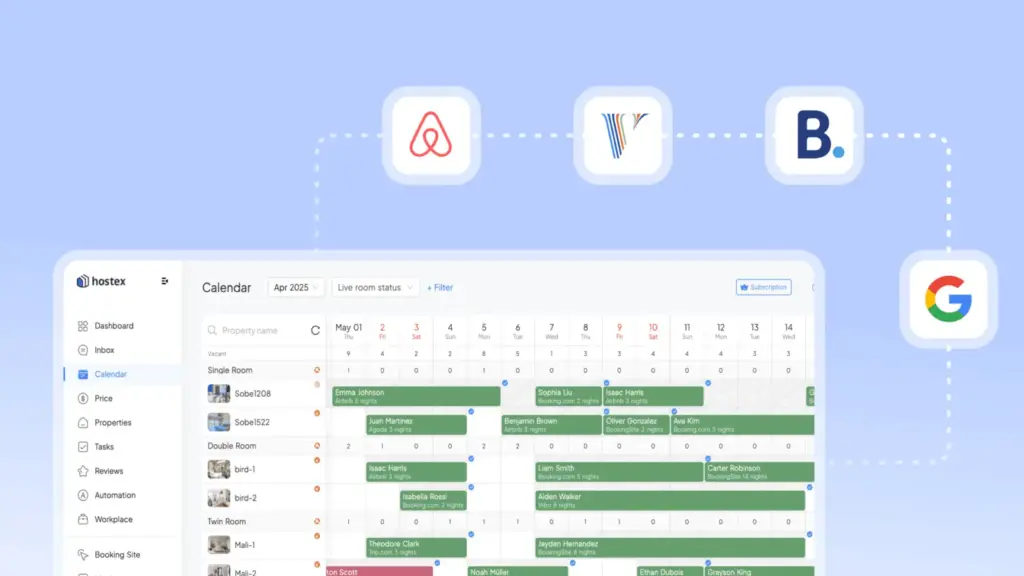
How to sync Airbnb, Booking.com, and your site
If you’re also receiving direct bookings from your site, you need to include that calendar in your flow as well.
For example:
Airbnb ⇄ website
Booking.com ⇄ site
Airbnb ⇄ Booking.com
This allows a booking from each channel to help block dates on other calendars.
For WordPress, Host Domination Booking Engine allows you to create a booking system on your website and connect external calendars via iCal/ICS.
You can therefore combine:
Airbnb
Booking.com
direct bookings from the website
keeping your Booking Engine availability centralized.
👉 Find out Host Domination Booking Engine:
https://hostdomination.com/booking-engine/
Can Google Calendar replace a Channel Manager?
No.
Google Calendar can be very useful as a Operational calendar.
For example, you can use it to view:
- reservations;
- check-in;
- check-out;
- appointments;
- activities;
- availability.
But it was not born as a professional system to distribute availability and rates between Airbnb, Booking.com and other OTAs.
It can therefore be a great complement, but it should not be confused with a Channel Manager.
Summary table
| System | iCal Update | Manual refresh | Real-time |
|---|---|---|---|
| Airbnb | about every 3 hours for imported calendars | ✅ | ❌ |
| Booking.com | Periodical | can be available | ❌ |
| Google Calendar | variable, often slower | No standard frequency control | ❌ |
| Channel Manager/API | depends on the integration | — | much faster |
The frequency can change over time and also depends on the configuration and platform that is importing the feed.
Frequently Asked Questions
How often does Airbnb update iCal?
Airbnb indicates that linked external calendars are automatically updated every 3 hours. You can also manually request an update of the imported calendar.
How long does it take for Airbnb to sync with Booking.com?
It depends on the direction of the sync. If Booking.com needs to read the Airbnb calendar, the time depends on the import made by Booking.com. If Airbnb is importing Booking.com, Airbnb indicates that external calendars should be automatically updated every 3 hours.
How long does it take for Google Calendar to update an iCal link?
There is no user-configurable interval. External calendars subscribed to via URL can take several hours to update, and in some cases the update can be on the order of about 24 hours.
Can I force iCal sync on Airbnb?
Yes. Airbnb provides a feature to manually update connected external calendars, within the limits set by the service.
Can I choose how often Google Calendar updates iCal?
Normally not. Google Calendar automatically manages how often Google Calendar checks an external calendar subscribed to by URL.
Does updating Google Calendar with F5 force sync?
Refreshing your browser page is not necessarily the same as asking Google to immediately reread the external iCal feed.
Why is Airbnb updated but Booking.com not?
Because the two platforms control external calendars at different times. The booking may already be present in the source calendar but not yet detected by the destination platform.
Is iCal real-time?
No. A normal iCal sync should be considered periodic, not real-time.
Does iCal sync Airbnb and Booking.com rates?
No. iCal is mainly used for calendar and availability information. A more advanced system is generally required to synchronize prices, rates, and restrictions.
Conclusion
So, how long does it take for iCal to update?
The correct answer is:
It depends on the platform that imports the calendar.
Airbnb currently indicates an automatic update of imported calendars every 3 hours, while other services may use different intervals. Google Calendar, in particular, can take much longer to update an external calendar subscribed to via URL.
The flow to remember is:
Booking
↓
updated original calendar
↓
iCal feed
↓
The external platform controls the feed
↓
New blocked dates
And it is precisely the last step that determines the delay.
For this reason, iCal is a very useful tool to synchronize availability between Airbnb, Booking.com and your site, but should not be considered an instant sync.
If you manage a few properties, it can be more than enough.
If, on the other hand, you have many apartments, frequent bookings and numerous sales channels, it may be advisable to consider a solution with more advanced synchronization.
Recommended SEO settings
SEO Title:
How long does it take for iCal to update? Airbnb and Booking
Meta description:
How long does it take for iCal to update? Find out how often Airbnb, Booking.com, and Google Calendar sync your bookings and calendars.
Slug:quanto-tempo-ical-aggiornarsi-airbnb-booking
Main keyword:
how long does it take for iCal to update
Secondary keywords:
- How often do you update iCal
- How often Airbnb updates the calendar
- Airbnb Booking synchronization time
- iCal Airbnb sync
- Booking.com update calendar
- Google Calendar iCal update
- how long does it take for Airbnb to sync
- Airbnb calendar update
- iCal auto-update
- Airbnb Booking Calendar Sync
- Google Calendar won’t update iCal
- update Airbnb calendar manually
Recommended category:
Resources for Airbnb → Hosts / Booking.com
Excerpt:
How long does it take to sync a booking via iCal? Let’s see how often Airbnb, Booking.com and Google Calendar update external calendars and why iCal doesn’t work in real time.