
Need to add a new page to your website? Do you want to create a photo gallery to showcase the rooms in your B&B, the apartments in your vacation rental or the services of your business?
With Host Domination Suite you can manage and update the content of your WordPress site independently, without necessarily having to require the intervention of a developer every time.
In this guide we explain how to create a new WordPress page, customize it and add a photo gallery using Host Domination Suite tools.
1. Log in to the Host Domination Suite panel
The first step is to log in to the admin area of your WordPress site.
- Open your browser and visit
www.tuosito.it/wp-admin. - Enter your login credentials.
- Once logged in, locate Host Domination Suite in the admin panel.
From the Host Domination Suite dashboard, you can quickly access tools to manage your site, edit content, organize your photos, and use other features.
The Edit site It allows you to reach the tools dedicated to editing your website.
2. How to Create a New WordPress Page
Do you want to add a page dedicated to your property, the services offered or perhaps the tourist attractions in the area?
To do this, use WordPress’ page builder feature.
- From the admin panel, open Pages.
- Click Add new page.
- Enter the title of the page, such as “Our rooms,” “The property,” or “Photo gallery.”
- Open the editor available on your site to start customizing the content.
If your site uses Elementor, you can select Edit with Elementor and work directly on the look and feel of the page.
With the editor, you can add headings, descriptive text, images, buttons, sections, and other elements to organize your content.
A tip: Always use a clear and relevant title. For example, for a vacation rental in Rome, a page titled “Our apartment in Rome” may be more useful and descriptive than a generic “Page 2.”
3. How to create a new Gallery with Host Domination Suite
Photographs are especially important for the websites of hotels, B&B, vacation rentals, and accommodations.
A well-organized gallery allows potential guests to get to know the rooms and evaluate the structure more easily.
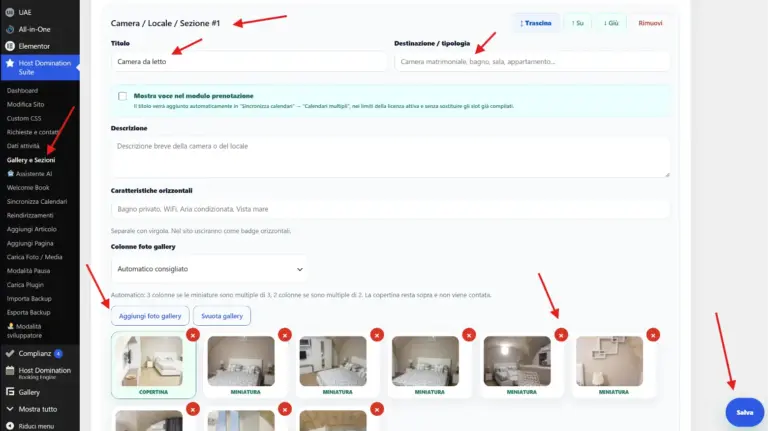
With Host Domination Suite, you can create and manage dedicated photo galleries.
Add photos
- Log in to the Host Domination Suite.
- Select Add gallery to create a new gallery.
- Give the gallery a recognizable name, such as “Double bedroom” or “Sea view apartment.”
- Select images from your media library or upload new photos.
- Organize the images in the order you want and save the gallery.
You can create different galleries for each room or type of accommodation.
For example, you could organize your photographs into galleries dedicated to bedrooms, kitchen, bathroom, terrace, swimming pool and common areas.
This system also makes future image management easier.
4. How to Add a Gallery to Page with Elementor
Once you have created your gallery, you can insert it on the desired page.
If you’re using Elementor, Host Domination Suite provides dedicated photo gallery tools, including:
- Advanced Gallery: to create a more articulated and customizable photographic presentation.
- Simple Gallery: to insert photographs with a more essential view.
- Shortcode Gallery: to call up an existing gallery using its shortcode.
Open the page with Elementor, locate the gallery widget you want to use, and place it in the desired section.
Select or link the gallery you previously created, depending on the options available in the widget.
Using a gallery shortcode
Each gallery can also be called up through its own shortcode.
Copy the shortcode shown in the gallery manager and paste it inside a widget Shortcode of Elementor or a block Shortcode of WordPress.
This way you can reuse the same gallery on different pages without having to upload all the photographs again.
5. Customize the page and publish it
After adding the content and the gallery, check that the result is consistent with the rest of your site.
Before publishing, please verify:
- Title and descriptions: They must clearly explain what the page displays.
- Photos: Choose good quality and relevant images.
- Mobile view: Check that the page and the galleries are also readable by smartphones.
- Buttons and Links: Verify that they lead to the correct pages.
- SEO: use a descriptive URL address and useful texts for visitors.
When you’re happy with the result, click Publish or Refresh to save your changes.
Remember that creating a page doesn’t necessarily mean automatically adding it to the navigation menu: if you want to make it accessible from the main menu, check your site’s navigation settings.
6. How to optimize new pages for Google
Creating new pages is not only used to improve the presentation of the site: it can also be an opportunity to increase visibility on search engines.
If you run a vacation rental or B&B, you could create pages dedicated to:
- Rooms and apartments available.
- Services and characteristics of the structure.
- Photo gallery of the rooms.
- Places of interest nearby.
- Information on how to get there.
- Tourist experiences and activities in your destination.
For each page, use a relevant title, original descriptions, and images with meaningful alt text.
For example, instead of calling an image IMG_1234.jpg, you can use a name like camera-matrimoniale-casa-vacanze-roma.jpg.
A clear content structure helps visitors find the information they want and makes it easier for search engines to understand the pages.
7. Watch the full video tutorial
Prefer to follow all the steps directly on the screen?
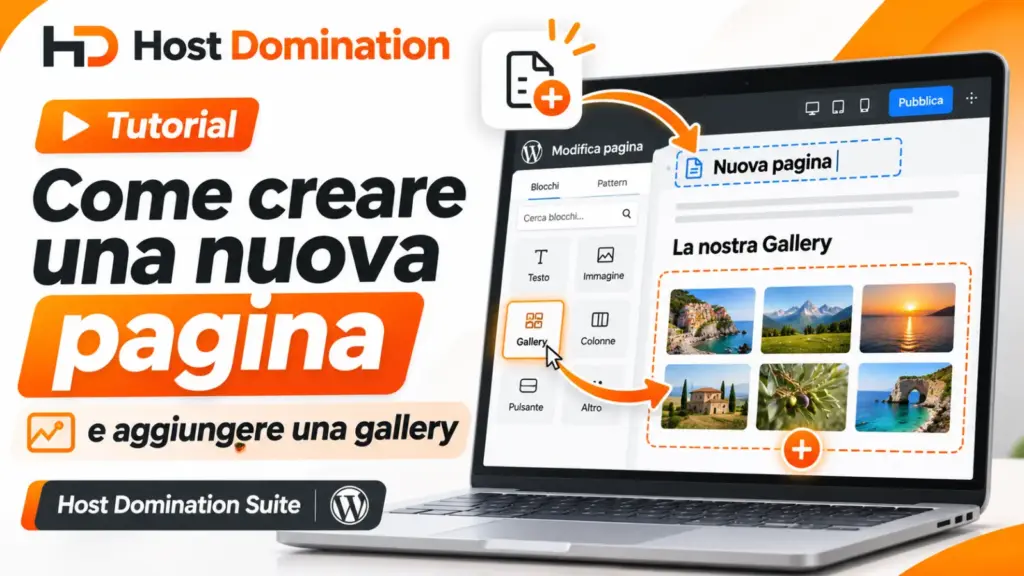
We have prepared a video tutorial dedicated to creating a new WordPress page and inserting a gallery with Host Domination Suite.
In the video, you’ll be able to see how to access the tools, create a page, add photographs, and publish content on your site.
[INSERISCI QUI IL VIDEO YOUTUBE]
Conclusion: manage your site independently with Host Domination Suite
Updating your website shouldn’t be complicated.
Thanks to Host Domination Suite, you can access tools designed to simplify the day-to-day management of your WordPress site.
Whether you run a B&B, a holiday home, a hotel or another business, keeping texts, photographs and pages up to date allows you to offer visitors more and more complete information.
Want to discover all the features available?
Visit HostDomination.com and discover our tools dedicated to creating and managing hospitality websites.
Frequently Asked Questions
Can I create a new page without knowing HTML or CSS?
Yes. WordPress has visual and block editors that allow you to create pages without writing code.
Can I add multiple galleries on the same page?
Yes. You can create different galleries and insert them into the desired sections, using the available widgets or shortcodes.
Can I edit a gallery after I publish it?
Yes. You can go back to Host Domination Suite’s gallery manager, edit your photographs, and save your changes.
Can I use the same gallery on multiple pages?
Yes. Dedicated shortcodes allow you to call up an existing gallery on different pages of the site.
Are new pages automatically shown on Google?
Not necessarily. To appear in search results, a page must be accessible and indexable. Indexing depends on several factors and does not guarantee a specific ranking.