Your digital Welcome Book, now far more powerful.
Create a polished guest guide for hotels, B&Bs, vacation rentals and guest houses.
Customize the experience, organize every section, add permanent guest shortcuts and extend it with dedicated add-ons.
Annual WordPress license · mobile-first · expandable through dedicated Welcome Book add-ons.
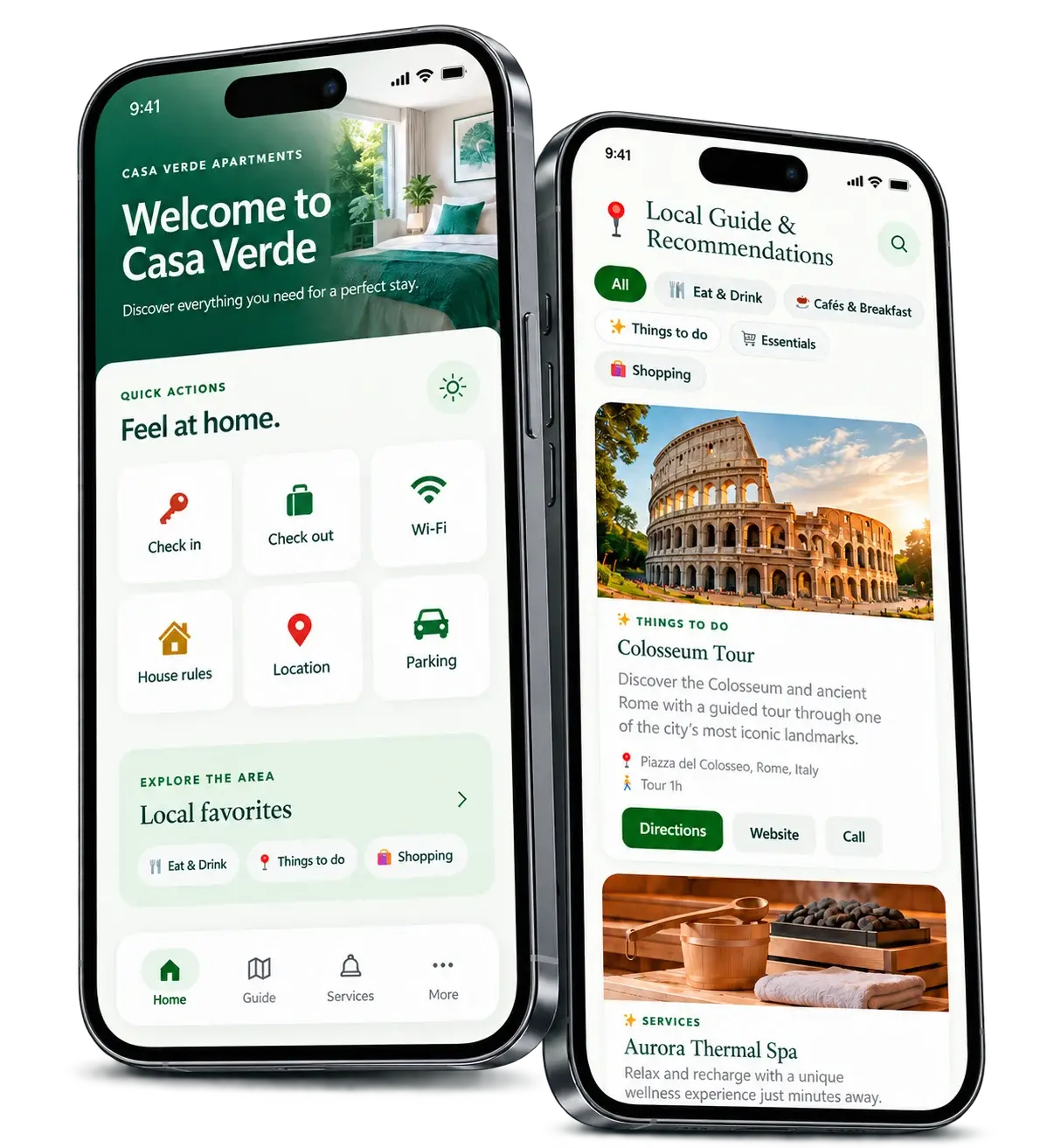
Guest contact shortcuts
Drag & drop sections
Custom buttons & links
Add-on ecosystem
More control over every part of the guest experience.
PRO turns the Welcome Book from a fixed information page into a customizable guest hub that adapts to the property and to the way you host.
Grid + popup or rows + accordion
Choose a compact visual grid with popup content or a full-width row layout with expandable accordion sections. You can switch the presentation without rebuilding your content.
Fixed guest contacts
Keep Call, WhatsApp and Location always accessible from the bottom guest bar, with independent on/off controls.
Live appearance controls
Customize icons, buttons, text, page background, surfaces and the bottom bar while previewing the result on a smartphone.
Desktop & smartphone columns
Set the number of columns independently for desktop and mobile to keep the layout balanced on every screen.
Add custom boxes
Create new sections beyond the default Welcome Book entries and use them for any property-specific information.
Drag & drop ordering
Reorder sections visually and decide exactly what guests should see first.
Duplicate, hide or remove
Duplicate useful sections, temporarily disable entries with a switch, or remove them entirely.
Buttons & links
Add a dedicated button label and destination to each section, including maps, menus, WhatsApp, house rules and external resources.
Logo & cover management
Manage the Welcome Book name, public slug, welcome message, logo and cover directly from the same setup area.
Design the Welcome Book while you preview it.
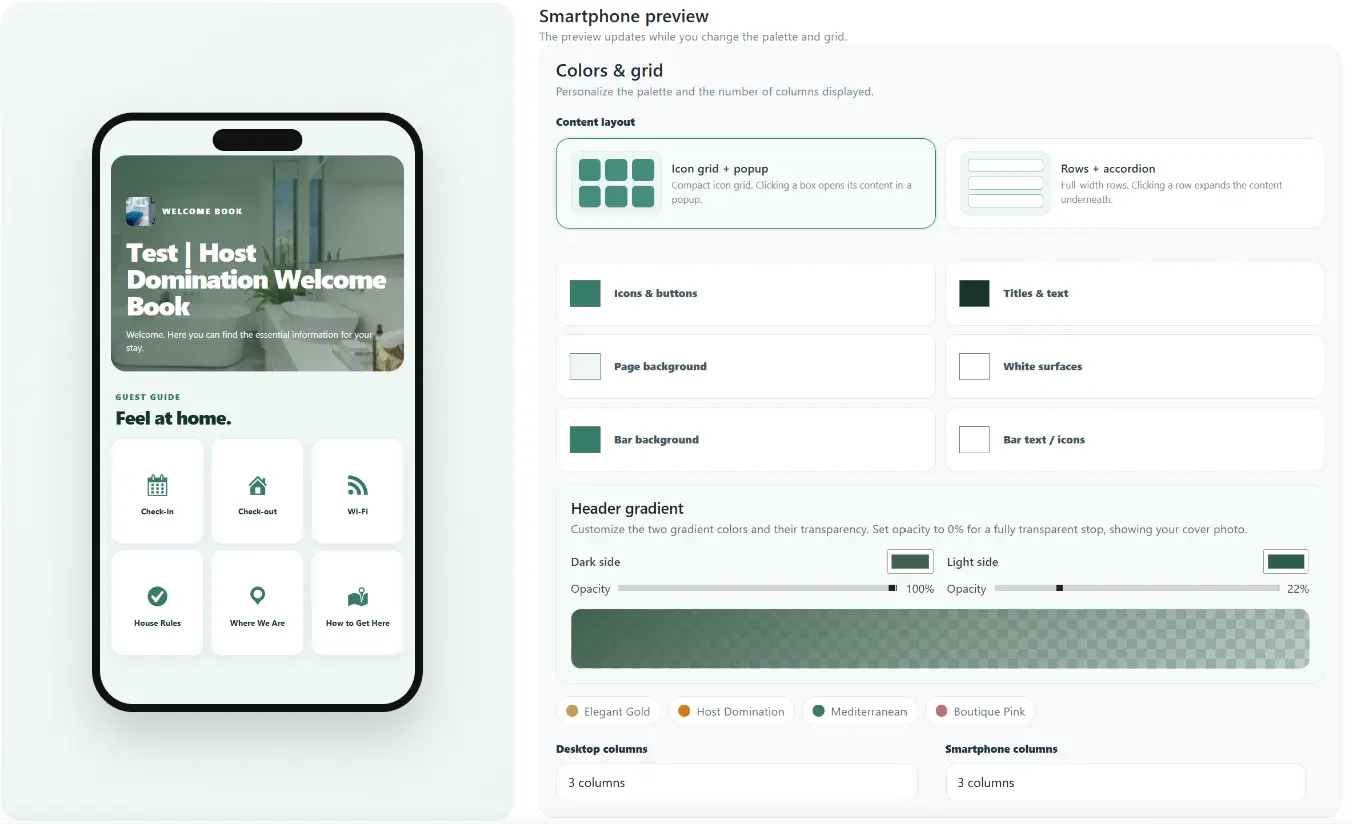
The PRO appearance panel gives you a smartphone preview and direct control over the way the guide is rendered.
- Choose between Icon grid + popup and Rows + accordion.
- Customize icons & buttons, titles & text, page background, white surfaces and bottom-bar colors.
- Use ready-made visual palettes or define your own colors.
- Set separate desktop and smartphone column counts.
Every section is editable, reusable and actionable.
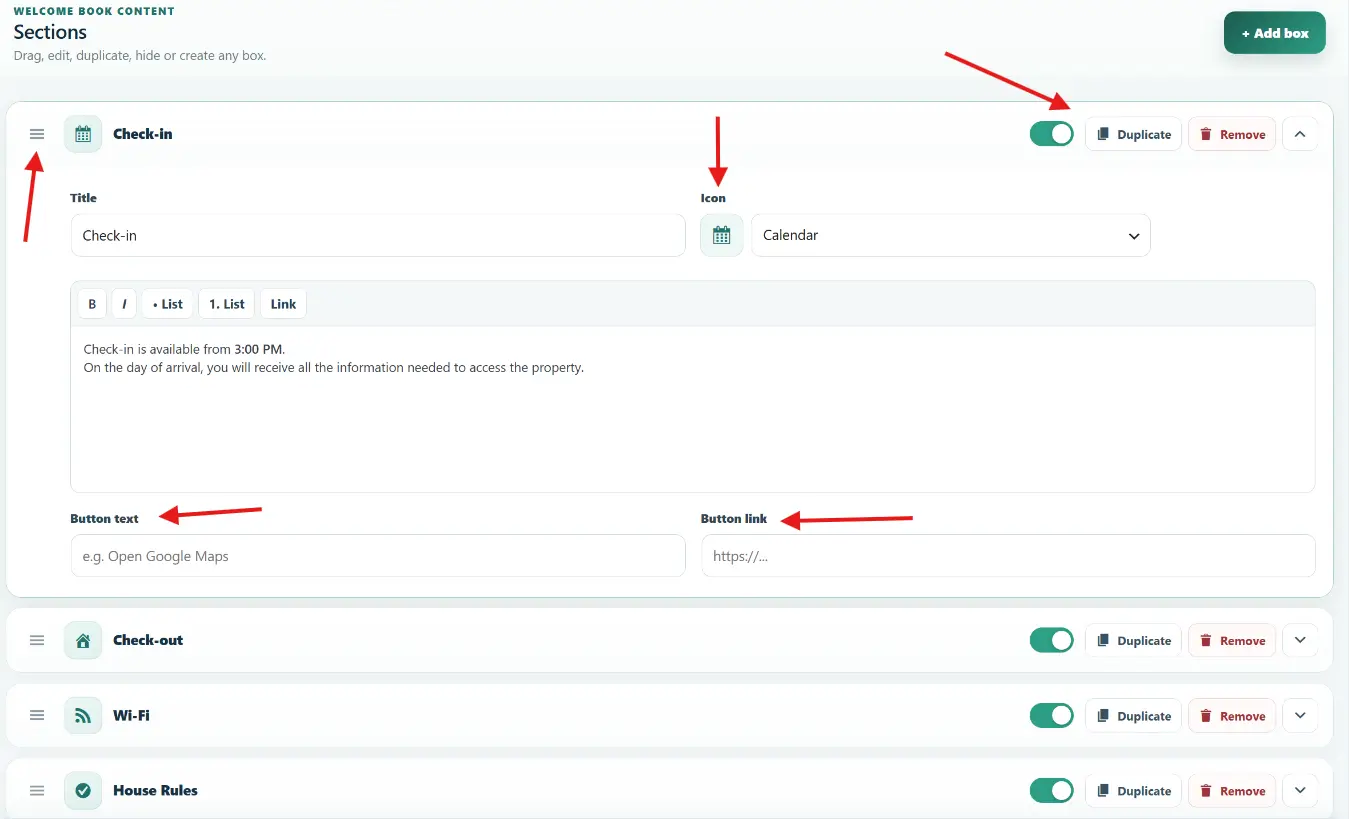
Manage guest content from one clean editor instead of working with a rigid set of fields.
- Drag sections into the order you prefer.
- Choose the icon for each section.
- Enable or disable individual boxes instantly.
- Duplicate existing sections to speed up setup.
- Add button text and button links directly inside the section.
- Create additional custom boxes whenever your property needs them.
Keep the main Welcome Book first. Put add-ons in the order you choose.
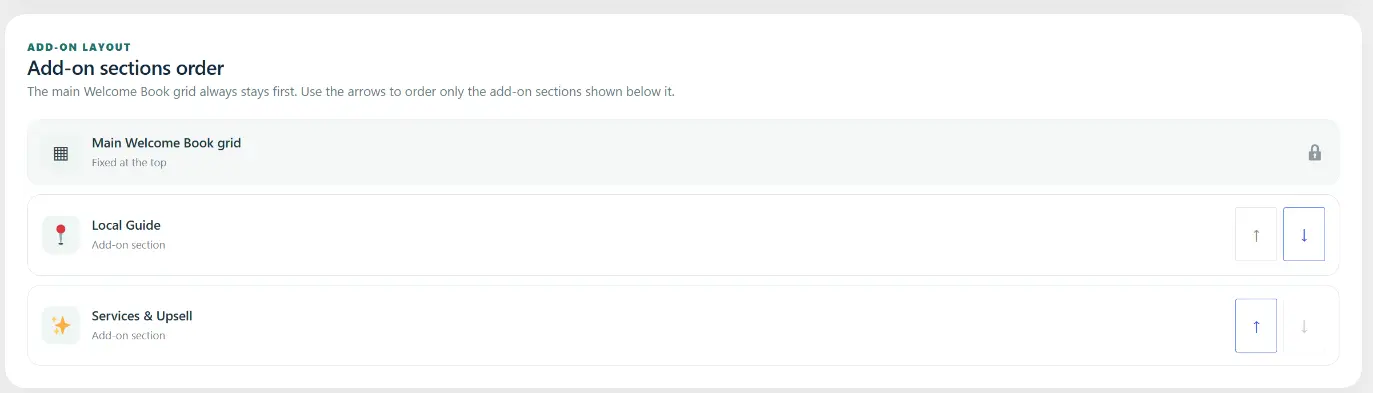
PRO introduces a dedicated add-on section order. The main Welcome Book grid remains fixed at the top, while installed extensions can be moved underneath it.
- Main Welcome Book grid stays fixed at the top.
- Reorder add-on sections with simple up/down controls.
- Build a cleaner guest journey from essential information to recommendations and upsells.
Extend the Welcome Book beyond property information.
Use dedicated extensions for local recommendations and bookable services, while keeping everything inside the same guest experience.
Local Guide
Turn your Welcome Book into a curated local guide with restaurants, cafés, attractions, shops, essentials and any custom recommendation you want to share.
Services & Upsell
Present extra services and upsells directly to guests: transfers, luggage storage, experiences, private services, add-ons and other purchasable extras.
Start with the essentials. Upgrade when you need full control.
Welcome Book PRO adds layout, branding, content management and extensibility features designed for professional hosting.
| Feature | FREE | PRO |
|---|---|---|
| Digital Welcome Book for guests | ✓ | ✓ |
| Default Welcome Book information | ✓ | ✓ |
| Icon grid + popup layout | — | ✓ |
| Rows + accordion layout | — | ✓ |
| Live smartphone appearance preview | — | ✓ |
| Advanced palette controls | Basic | ✓ |
| Independent desktop/mobile columns | — | ✓ |
| Fixed Call / WhatsApp / Location guest actions | — | ✓ |
| Add new custom sections | — | ✓ |
| Drag & drop section ordering | — | ✓ |
| Duplicate / hide / remove section controls | — | ✓ |
| Custom icon per section | — | ✓ |
| Button text + button link per section | — | ✓ |
| Custom CSS / advanced styling | — | ✓ |
| Add-on section ordering | — | ✓ |
| Compatible with Welcome Book add-ons | Limited | ✓ |
What hosts say about Welcome Book PRO.
Feedback from accommodation professionals using Host Domination Welcome Book PRO.
5.0/5 · 22 ratings
5-star rating
5-star rating
5-star rating
5-star rating
5-star rating
5-star rating
5-star rating
5-star rating
5-star rating
5-star rating
5-star rating
5-star rating
5-star rating
5-star rating
5-star rating
5-star rating
5-star rating
5-star rating
5-star rating
5-star rating
5-star rating
5-star rating
A more professional guest experience for €19.90/year.
Unlock the full Welcome Book editor, advanced layouts, fixed guest contacts, appearance controls and the PRO add-on workflow.
- Grid + popup and rows + accordion layouts
- Live smartphone appearance preview
- Advanced color and visual customization
- Fixed Call, WhatsApp and Location shortcuts
- Custom sections and drag & drop ordering
- Duplicate, hide and remove section controls
- Custom icons, buttons and links
- Desktop and smartphone column controls
- Add-on section ordering
- Future PRO updates
Frequently asked questions
How much does Host Domination Welcome Book PRO cost?
The PRO license costs €19.90 per year.
Can I choose a different layout?
Yes. PRO lets you choose between an icon grid with popup content and full-width rows with accordion content.
Can guests always access WhatsApp or the property location?
Yes. PRO includes fixed guest actions for Call, WhatsApp and Location, and each shortcut can be enabled or disabled independently.
Can I create my own sections?
Yes. You can add new custom boxes, reorder them, duplicate them, hide them and customize their icon, content and button.
Can I customize the appearance?
Yes. PRO includes a smartphone preview, palette controls, independent colors for interface elements, and desktop/mobile column settings.
What is Local Guide?
Local Guide is a Welcome Book add-on for organizing local recommendations such as restaurants, cafés, attractions, shops, essentials and custom places.
What is Services & Upsell?
Services & Upsell is a Welcome Book add-on for presenting guest services and purchasable extras, including request and checkout-oriented flows.
Can I choose where add-ons appear?
Yes. The main Welcome Book remains fixed first, while add-on sections can be reordered underneath it.
Give guests the information they need.
Then give them more ways to act on it.
Host Domination Welcome Book PRO · €19.90/year · expandable with dedicated Welcome Book add-ons.