
Do you want change your WordPress site’s password? If you use Host Domination Suite, you can change your password to access your site in a few simple steps, without special technical knowledge.
In this short guide, we explain how to update your WordPress password easily and securely.
How to Change WordPress Password: All Steps
- Log in to your WordPress site using your credentials.
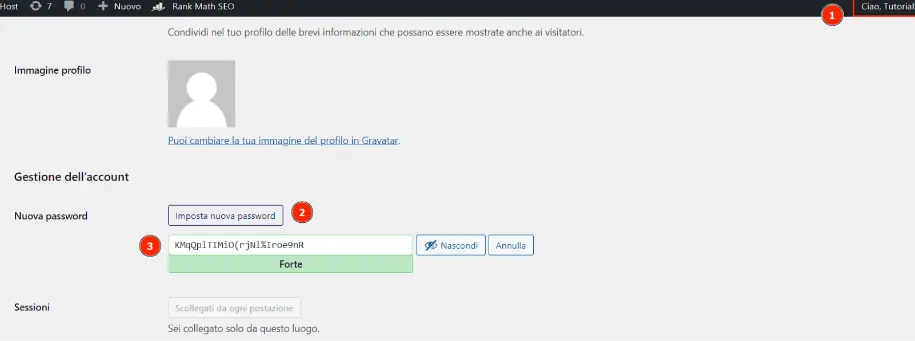
- Open your profile: from the top bar of WordPress, click on your username and select Edit profile.
- Find the Account Management section: Scroll down the page to the password item.
- Set a new password: Click Set New Password and enter the password you want to use.
- Save your changes: Click the Update Profile at the bottom of the page.
That’s it! Your WordPress site’s password has been updated.
Tips for choosing a secure password
To protect your WordPress site from unauthorized access, we recommend using a password:
- At least 12-16 characters long.
- Composed of a combination of letters, numbers and symbols.
- Unique, therefore not used on other sites or services.
Manage your site easily with Host Domination Suite
Host Domination Suite it helps you manage your WordPress site through an intuitive panel, with tools dedicated to content editing, image management, SEO, and much more.
Remember to keep your credentials up to date and use strong passwords to protect your site and business data.